Pay and Benefits
A worker’s pay and benefits package is based on an agreement which sets out the relationship between the worker and the employer. In practice, the agreement is in the context of a country which effectively extends the agreement with statutory regulations.
paiyroll® models the pay, benefit and statutory aspects of this extended agreement using Pay Items attached to the worker. Setting up a worker involves:
Analysing the agreement to identify the elements of Pay and Benefits.
Incorporating statutory taxation and social security elements.
Mapping each element to a Pay Item.
Each Pay Item is derived from a Pay Definition, which in turn is derived from a Pay Template:
Pay Items
A Pay Item describes worker-specific values of a pay arrangement so that, for example, the annual salary or the bonus amount for each worker may be different.
However, the concept of an annual salary may apply to many workers, and many aspects of an annual salary may be the same for all of them (for example the need to pay income tax). Therefore, Pay Items are based on Pay Definitions which capture the common aspects.
Pay Definitions
A Pay Definition, describes the worker-independent values and aspects of a pay arrangement:
Company-specific descriptive text, default values. For example, the name of a bonus Pay Item might be “Xmas Bonus” with a 5% value in one company, and “Profit Share” with a 3% value in another.
Note that the default values are overridden by the Pay Item.
Underlying calculation logic. For example, different Pay Definitions such as an annual bonus and a clothing allowance might share an underlying calculation (e.g. a percentage of gross pay) but might be taxed differently.
Therefore, Pay Definitions are based on Pay Templates which capture the common aspects.
Pay Definitions might cover:
Pay elements such as Annual Salary or Weekly Timesheets.
Benefit elements such as Annual Bonus or Pension arrangements.
Country-specific elements for taxation and other statutory requirements such as student loan repayments.
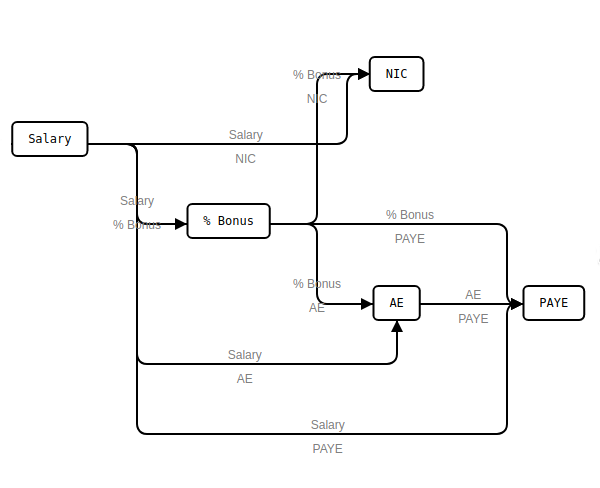
Outputs from one Pay Definition connect to inputs on other Pay Definitions using Busses. Each Pay Definition input also has:
a source which defines who can modify it (for example, the employee’s manager or an HR administrator).
a reuse policy which controls whether the value of the input is reusable, or if it must be updated before it can be used.
Reuse Policy¶ Reuse Policy
Prompt
After Use
Reuse
Use indefinitely
Only if not set
Unchanged
Indefinitely
Use once, then unset
Always
Delete
Never
Use once, then set to zero
Only if not set
Set to zero
Never
Never prompt even if unset
Never
Unchanged
Indefinitely
Together, these allow the system to both identify missing data and the person (or role) responsible for providing the update.
Busses
A Buss is a named connection between the output from one Pay Definition to the inputs of one or more other Pay Definitions:
One output can be connected via a Buss to multiple inputs
For example, annual salary might be subject to income tax and social security tax, whereas tips might only be subject to income tax. Therefore, care must be taken to ensure that applicable laws are taken into account when updating Pay Definitions.
Multiple Pay Definitions can output onto the same buss. The outputs are combined in some way, commonly by adding them together:
Multiple outputs can drive a single Buss
The resulting interconnected Pay Items can be directly visualised as an “interactive pay slip” for each worker, and by each worker:
Pay Templates
Pay Templates are associated with a country, and a Company can only use those with its country, or “Universal”. Each Pay Template has a defined number of inputs, outputs and state, and a given calculation logic or algorithm. The inputs, when exposed via a Pay Item, configures a worker’s pay and benefits. See Pay Templates for details.
Some Pay Templates have associated Pay Schemes which allow some configuration, usually at the Company level, to be shared across workers.
Pay Schedules
Each Pay Item is also attached to a Pay Schedule. This makes it easy to implement frequency-based pay runs such as Weekly and Monthly:
The inputs on Pay Items can be set to be reused for subsequent pay runs (useful for fixed elements such as annual salary), or reset after use in a given pay run (for example, sales-based commission).
Summary
A worker has Pay Items.
Pay Items are based on Pay Definitions.
Pay Definitions effectively represent the model by which a Company pays its workers.
Pay Definitions are based on Pay Templates.
Pay Templates define the calculations which underpin the Pay Item.
Busses connect Pay Definitions.