Paiyroll® internally stores year-to-date (YTD) values on either the Company or Employee as appropriate. Generally, you should not modify these values, but you can if needed, though this is at your own risk. This guide gives some examples of when this might be needed, and then explains how.
Example: Correcting Pension (AE) Company YTD #
As Pension YTD information is not available during an FPS import, specific rules are used to calculate these values. Therefore, some imported worker data may not include the correct pension company YTD information, for example, when salary sacrifice is used, or a worker has non-standard contribution rates. Although pension values are correct at the provider, they may display correctly on the payslip. These values do not affect any calculations, and many clients choose not to make corrections because they reset each April automatically.
Example: Adjusting Gross pay YTD #
Paiyroll® uses several versions of Gross pay, each with a corresponding YTD value, such as:
- “generic” Gross pay.YTD
These are maintained automatically on a per-employment basis and should not normally be adjusted.
Correction procedure #
Caution: If necessary, you can change the values in the paiyroll® internals, but this is at your own risk. Changing an Employee’s state always entails some risk, and that is why this procedure is required. (A similar procedure and risks applies to Company state). If you decide to proceed, we recommend you try the procedure on one worker before making additional changes:
- Navigate to Employees > Update for the affected worker.
- Click the System tab, and open State.
- Make sure you put “ytd” in the Search box
- Adjust the two values indicated:
- these values will be the year-to-date after the last approved pay run and before the next pay run
- these values are for Correcting Pension (AE) Company YTD and will need adaptation as required
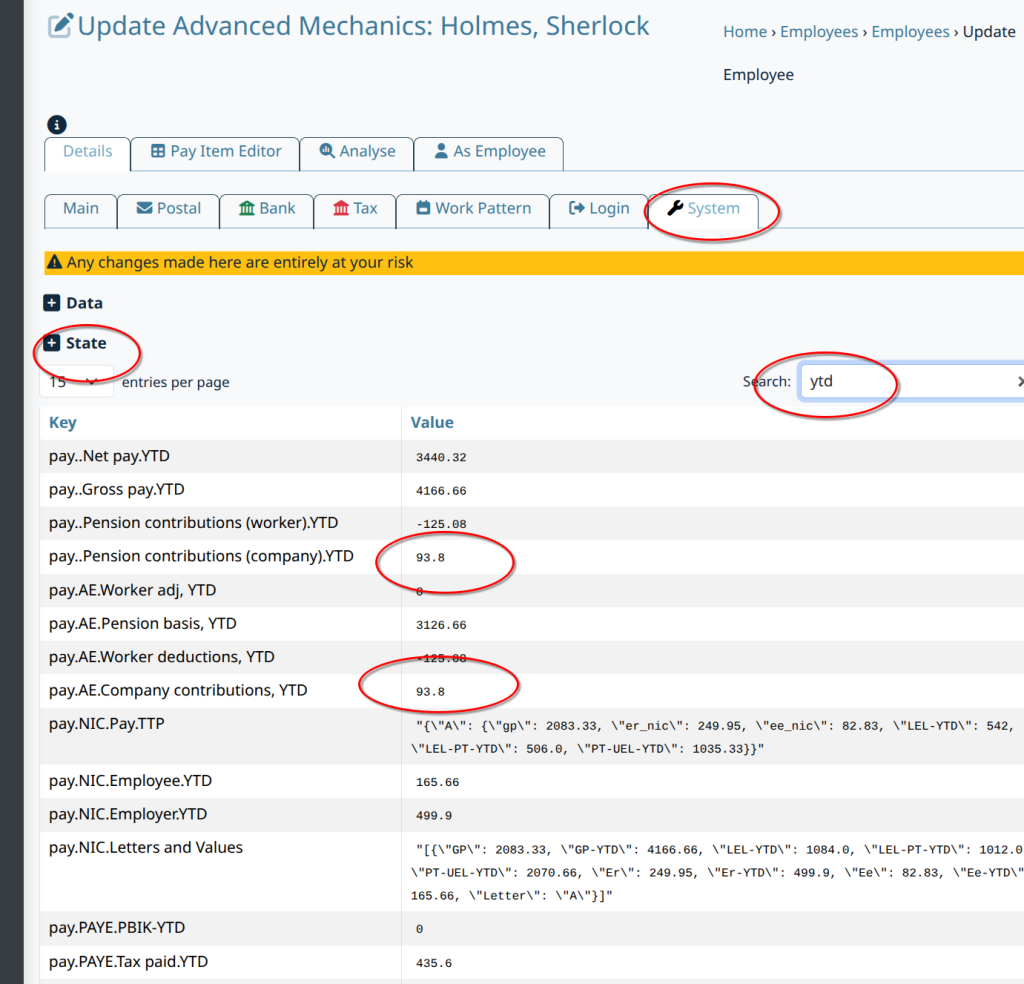
Don’t forget to Update to save the changes before attempting to view the results.
Verification #
To verify the results, you will need to Redo the pay run and view the payslips in Documents.
The YTD values on the payslip will then be the values you entered, plus any new values originating from the pay run you are viewing.