Follow this guide to set up a Salary Sacrifice Pay Definition. Please ensure your scheme meets all salary sacrifice rules.
You can base this on:
- A simple Payment pay template, which is added when the scheme starts and removed or zeroed when you wish it to stop
- A Loan (amount) pay template which can be set once and operate automatically, then stop
Based on Payment Pay Template #
Company setup > Pay Definitions > Add
Select the Company and Payment Pay Template.
Suggest Cycle to Work as the Name and Description.
Change the Reuse to Use indefinitely
Outputs: Clear the .Gross Pay tick box to allow gross pay to continue to be the reference salary for reporting (this does not affect pay).
Click Update to add the pay definition.
Pay Item #
Pay Item Editor > Search for the employee
Select the Cycle to Work Pay Item and then click the Create button
The Pay item will appear on the employee.
Enter the required value as a negative amount, e.g. -100, which will reduce taxable and NIable pay
Click Update to view the mini payslip and check the correct operation.
Based on Loan (amount) Pay Template #
Company setup > Pay Definitions > Add
Select the Company and Loan (amount) Pay Template.
Suggest Cycle to Work as the Name and Description.
Inputs: Change the Earnings source to buss: .Gross Pay
Outputs: Change all the Output Busses as below, ensuring that .Gross Pay is never selected:
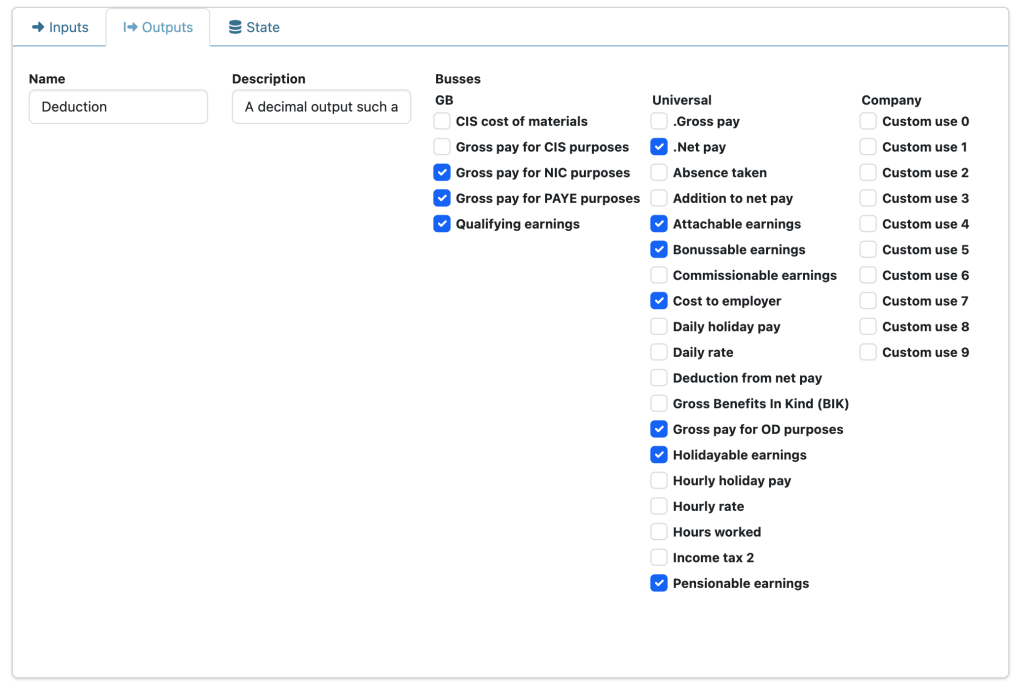
Click Update to add the pay definition.
Pay Item #
Pay Item Editor > Search for the employee
Select the Cycle to Work Pay Item and then click the Create button
The Pay item will appear on the employee.
Enter the required positive values:
- Debt is the total sacrifice to be made over several pay runs
- Repayment is the amount in each Pay run, e.g. 100
- Protected: 0
- Reference can be any useful string about the cycle
- Enter a Start date to commence
If you hover over the Pay Item Input names, a tooltip will provide more information.
Click Update to confirm the mini payslip and correct operation:

The amount will continue to be taken until the total Debt is exhausted.