Table of Contents
Follow this guide to use or add a salary pay item.
Annual Salary #
This is based on an annual salary value, which is automatically prorated for starters and leavers.
Go to the Pay Item editor and Search for the employee.
Select Salary in the Create Pay Item and click Create:

Enter the Annual Base Salary and click View/Update Payslip:

Confirm that the mini payslip shows the expected pay.
Fixed recurring salary, e.g. Monthly #
This salary is a fixed value and will repeat indefinitely
Setup > Pay Definitions > + Add…
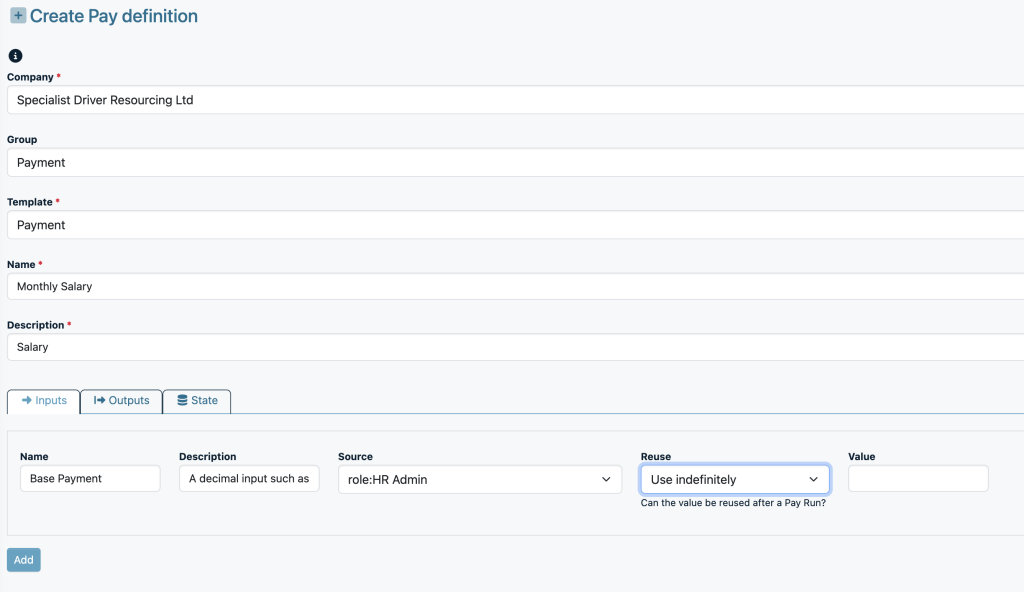
Click Add
In the Pay Item Editor, add this to the relevant employees, enter the period amount and click View/Update Payslip.